Multi Clipping Path Service
Separated, Editable Paths for Every Component
Most clipping work gives you one path around one product. Multi clipping path work gives you a path around every component inside it — the body, the chain, the logo, the contrast trim, each panel — separated, individually editable, and named so your team can find what they need without hunting through a layer stack.
That's the deliverable. Not a finished image. The structure your team works from.
Start with a Test BatchWhat you actually receive
A multi clipping path file is one image containing many hand-drawn paths, each isolating a different component, material, or colorway region. Sometimes called multi masking. Every path is drawn with the pen tool by a retoucher looking at the actual edge of the actual component — the same craft as single-path clipping, applied to every separable element in the frame rather than just the outer silhouette.
Named logically, not numerically.
This is the part that determines whether the file is usable or just technically correct. Your paths arrive named for what they are: body, chain, logo, white leather, cream leather, pink leather. Not Path 1 through Path 7. Your team opens the file, sees the component they need, and selects it. Nobody has to reverse-engineer which anonymous path corresponds to which part of the bag.
Delivered as an editable layered file.
The paths live in the file, not in a separate document or a spec sheet. Open it, select a named path, work. If your team wants to recolor the chain without touching the leather, that's one click away rather than a fresh isolation job.
Separated by what actually differs.
Material, texture, colorway region, hardware, trim, component. We separate on the lines your team will actually need to edit along, which we establish with you at onboarding rather than guessing at.
Why AI and bulk shops can't deliver this
An AI background remover produces a raster cutout: a fixed-resolution image with the outline baked into pixels. Even when it outputs a transparent PNG, that transparency is one region — the product versus everything else. There is no chain. There is no logo. There is no separately selectable cream leather region you can recolor without touching the panel next to it.
This is not a quality gap that closes as AI improves. It is an architectural difference in what gets produced. A raster cutout is finished output — one shape, locked. A multi-path file is editable structure — many named regions, each independently addressable. Better AI produces a better raster cutout. It does not produce a named component path, because that is not the kind of thing it makes.
Bulk clipping shops fail differently. The pen tool is available to anyone, so the technique isn't the barrier — the naming is. A multi-path deliverable is only usable if the convention holds across every file in the batch: the same component called the same thing on image one and image forty, every path named, nothing left as Path 6. That's a QC discipline, not a drawing skill, and it's the first thing to break in a shop optimizing for volume at commodity rates. A batch where the naming drifts halfway through is a batch your team has to audit before they can use it, which is the cost you were outsourcing in the first place.
That's the honest version of the moat. Not that this work is impossible for others — that it's the kind of work that only stays consistent when a studio is organized around doing it.
The products this is for
The list below is the expertise signal. These are the product categories where single-path clipping runs out and multi-path work starts.
Handbags.
Body, strap or chain, hardware, logo, contrast trim, and each panel as its own path. A chain-flap bag with contrast chevrons might carry six to eight separately editable regions.
Jewelry.
Each stone, each metal, settings, chain. A gemstone necklace is the hardest common case — twenty or more individually isolated elements in a single frame, each one small, each one needing a clean edge.
Multi-colorway garments.
Recolorable panels separated so a single shoot generates every SKU variant. Shoot once in one colorway; produce eight. The same discipline behind our apparel catalog retouching.
Garment components.
The request pattern we see most often from apparel clients: entire model, entire top, entire pant, skin, logo, shoes, zipper pull (metal and plastic separately), props, trims. Each isolated, each named.
Bedding sets.
Each pillow, each blanket, each item in the set separately — so a bedding brand can swap one element without rebuilding the composition.
Eyewear.
Frames separate from lenses. Two components, but the lens edge is transparent and the frame edge is not, which is exactly the kind of case that defeats an automated single-pass isolation.
Furniture.
Mesh, wood, and metal sections separated by material, so finish variants can be produced without reshooting the piece.
Common uses: variant and colorway generation from a single shoot, per-component editing, color separation, product configurators, and tech pack preparation — including e-commerce photo editing pipelines.
Two ways to work with us
You take the paths and run with them.
We deliver the separated, named, editable component paths. Your team produces the variants, the recolors, the component edits — in-house, on your timeline, as many iterations as your product line needs. This is what most clients do. They want the infrastructure, not the output, because once they have the paths they can generate work indefinitely without coming back to us for each variant.
We do the color and variant work for you.
If your team doesn't have retouching capacity, or the variant work is a one-time push rather than an ongoing need, we produce the finished variant images directly. Same paths underneath, but you receive the completed images rather than the structure.
Most clients take the paths and run with them. That tells you something about what we actually are: the specialist layer other production teams build on, rather than a shop that hands back finished files and hopes you come back next quarter.
Tell us which model fits at the quote stage. Some clients start with the second and move to the first once they see how much variant work the paths unlock.
What the paths produce
Three sets below, each one product photographed once and produced across four colorways from the separated paths. These are our own work on our own material — no client work appears on this page, because our clients' work is under NDA and stays there.
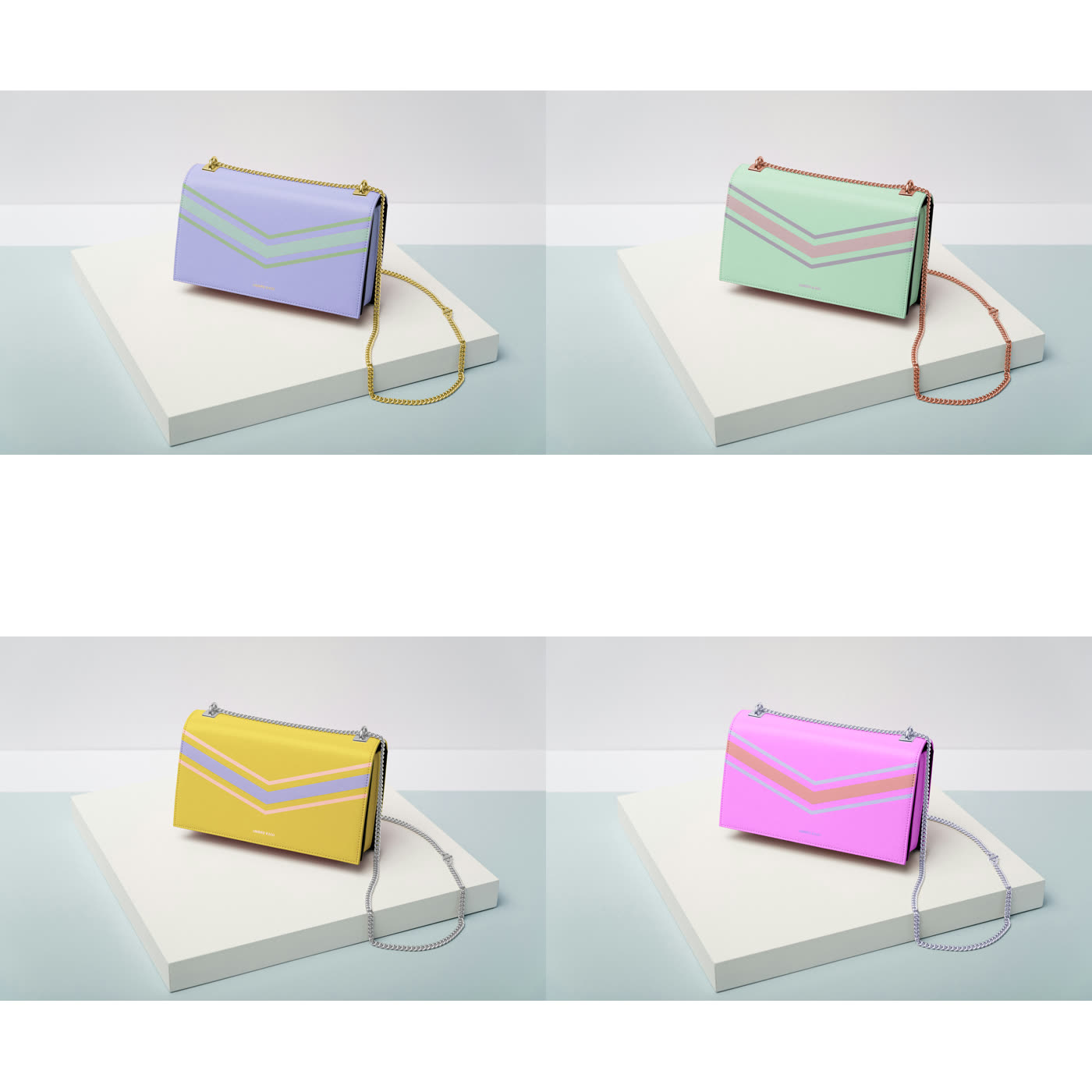
Chain-flap bag with contrast trim
Lilac, mint, yellow, pink. Body, chevrons, chain, and hardware recolored independently. The clearest demonstration that the components separate.
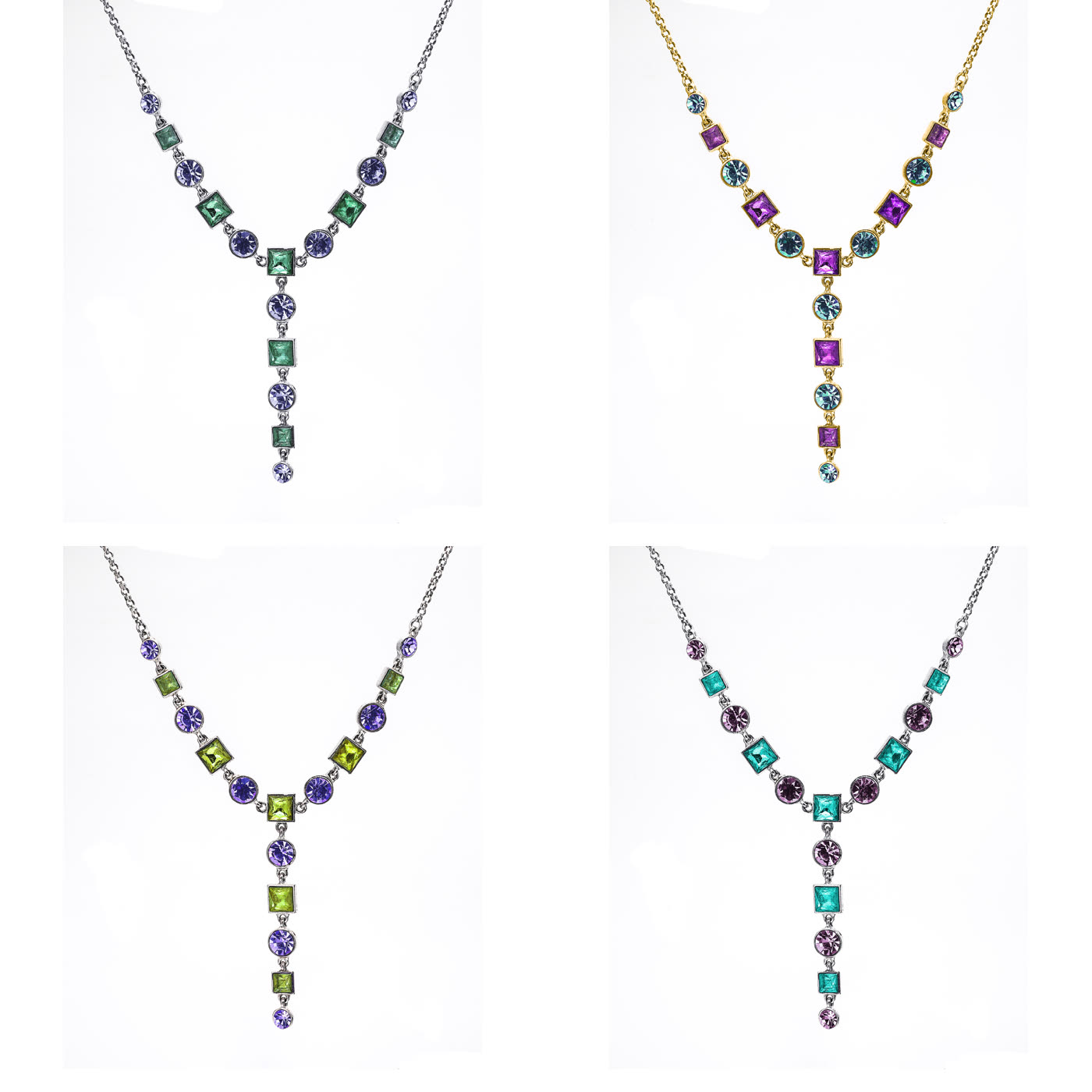
Gemstone necklace
Four colorways. Each stone isolated separately. The highest component count in the set.
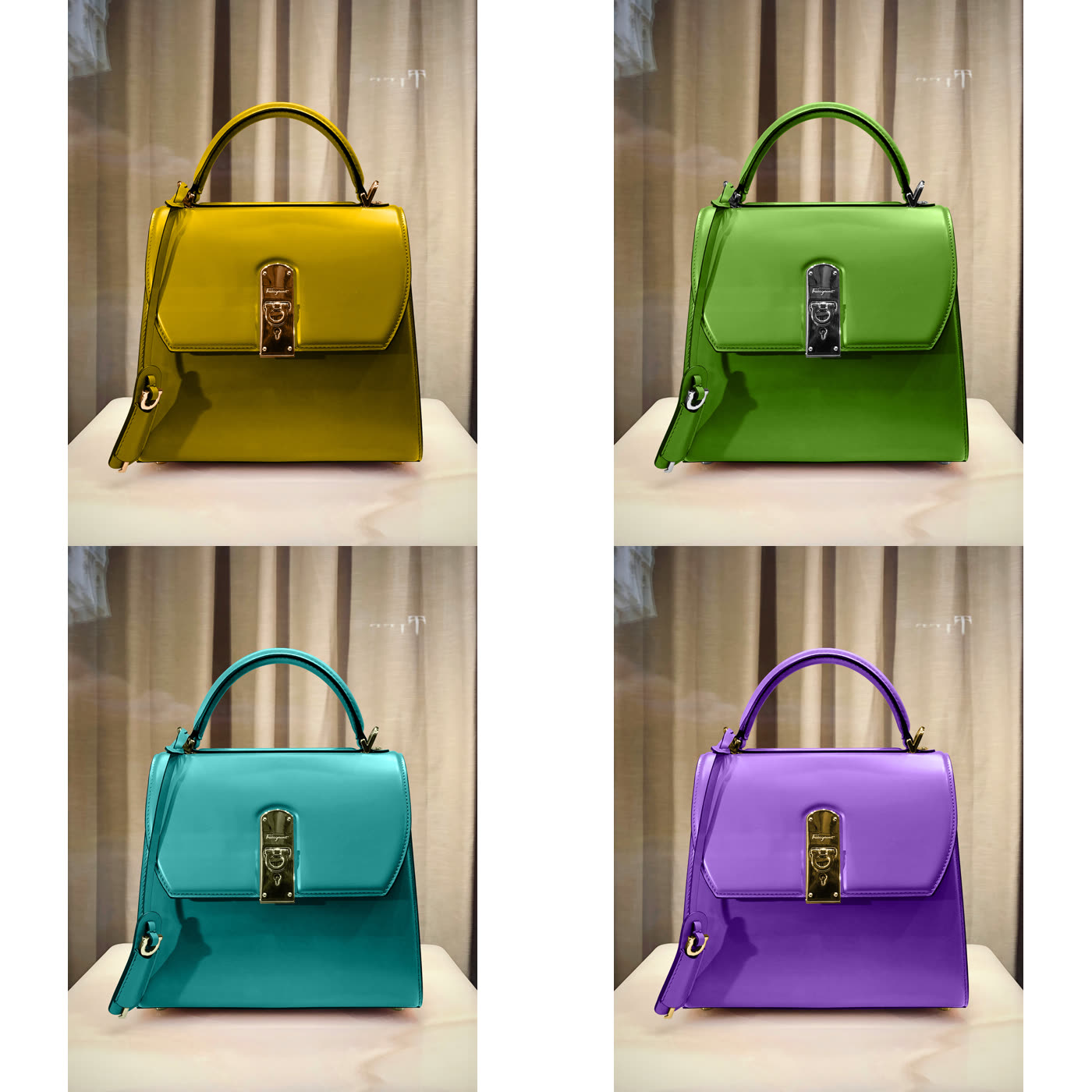
Top-handle bag
Mustard, green, teal, purple.
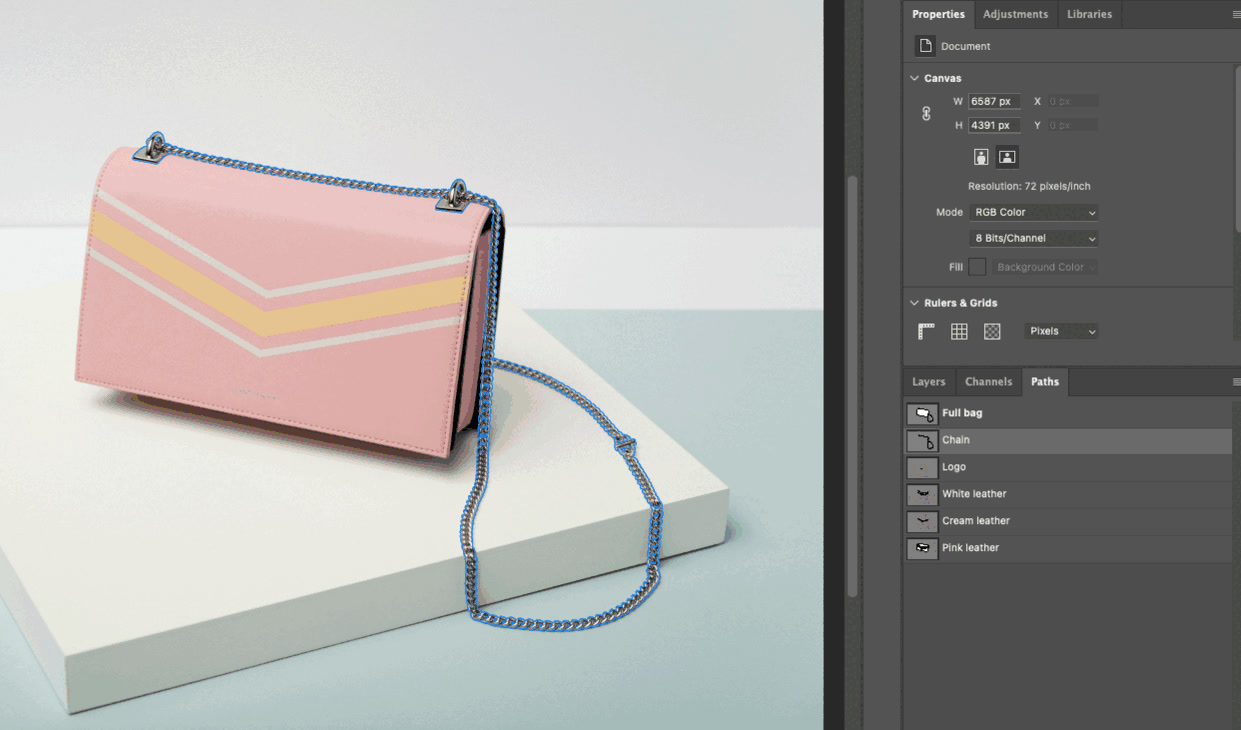
The Paths panel of a delivered file. This is what you receive.
How we work
Specialists, not generalists.
Multi-path work goes to retouchers who do it regularly. The judgment involved — where to separate, how to handle a component that partially occludes another, when a material boundary is a path boundary and when it isn't — is learned by doing it repeatedly, not by reading a spec.
Naming conventions agreed at onboarding.
Before the first batch, we establish how your team wants components named and separated. If your tech pack calls it "shell" and we call it "body," the file arrives useless to you. We use your vocabulary, not ours.
Every file through internal QC.
Preparation, main path work by the specialist, and an internal review pass before delivery. On multi-path work the QC pass checks two things: that every path is clean at the edge, and that the naming is complete and consistent across the batch. A file where path five is unnamed on image forty is a file your team has to fix.
Consistency across a program.
Your naming scheme and separation logic stay on the account. Order two follows the conventions established on order one without you re-briefing them. On a multi-colorway program running across seasons, that consistency is what makes the files usable at volume rather than one-off.
File transfer on your terms.
Client portal, SFTP, or we pull directly from your servers. Whatever your pipeline already uses. See our full process.
Standard single-path clipping
If what you need is a clean cutout of the product as a whole — one outline, one path, product isolated from background — that's standard clipping path work rather than multi-path. Different job, different pricing structure, same craft underneath.
Why brands bring the complex work here
We've been drawing paths since 2013, and across that time we've processed more than 3 million images. That volume is the reason the multi-path capability exists: 30 retouchers organized by category specialty means there is a group who does layered component work regularly rather than encountering it as an exception.
A multi-office structure — US studio, Paris office, international production team — keeps client coordination close and production planned rather than improvised. For a multi-colorway program running across a season, planned capacity is the difference between the files arriving when the campaign needs them and arriving after.
Complex path work is where the difference between a studio and a service shows up. Anyone can quote it. Fewer can deliver file forty in the batch to the same standard as file one, with the naming intact.
Start with a Test BatchFrequently asked questions
What is a multi clipping path?
One image containing multiple hand-drawn paths, each isolating a separate component, material, or colorway region — rather than a single path around the product as a whole. A handbag might have separate paths for the body, chain, logo, hardware, and each contrast panel. Each path is independently selectable and editable in the delivered file.
How are the paths named?
For what they are: body, chain, logo, white leather, and so on. Not Path 1 through Path 7. We agree the naming convention with you at onboarding so it matches your team's vocabulary and your tech pack terminology.
Do you do the recoloring, or do we?
Either. Most clients take the separated paths and produce the variants in-house, because once the structure exists they can generate work indefinitely without coming back to us. If your team doesn't have the retouching capacity, we produce the finished variant images instead. Tell us which model fits when we quote.
What file format do we receive?
An editable layered file with the paths saved into it — typically PSD or TIFF, depending on your pipeline. The paths are in the file itself, not in a separate spec document, so your team opens it and works.
Can AI tools do this?
No, and not because of quality. AI background removal produces a raster cutout — one region, the product against everything else, with the edge baked into pixels. It does not produce multiple separately named and independently editable component paths, because that isn't the kind of output it generates. The difference is architectural rather than a quality gap that closes as models improve.
How long does multi-path work take?
Longer than standard clipping, and quoted per project. The timeline depends on component count per image, batch size, and how much separation your program actually needs — a two-component eyewear job and a twenty-stone necklace job are not the same work. We commit a timeline at quote so you have a date to plan against.
Start with a test batch
Send us a small batch of your most complex product images — the ones with the most components, the trickiest material boundaries, the colorway structure you actually need to produce. We'll do the multi-path work and deliver the file the way we'd deliver it at volume: paths separated, named to your conventions, ready for your team to work with.
Then open it and see whether the structure is what you need.